
Laravel Model Observers are one of the most powerful — and most overlooked — features in the Laravel framework. If your controllers are bloated, your logic is duplicated, and your codebase feels harder to maintain every week, there is a good chance you are not using them yet.
The Problem Nobody Talks About (But Every Laravel Dev Faces)
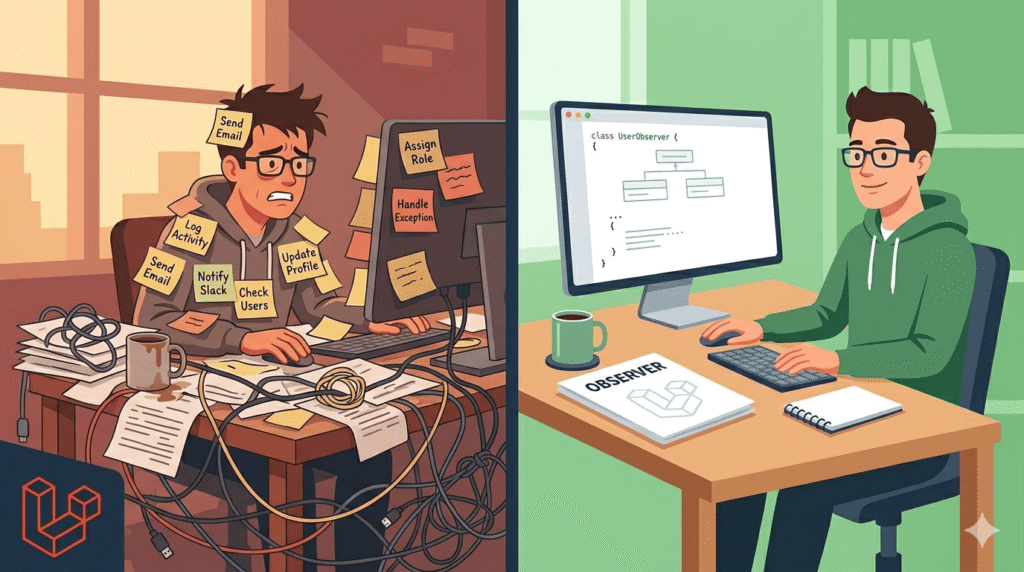
Picture this. You start a new Laravel project. Everything is clean. Controllers are lean. Life is good.
Three months later, your UserController looks like this:
public function store(Request $request)
{
    $validated = $request->validate([
        'name'     => 'required|string|max:255',
        'email'    => 'required|email|unique:users',
        'password' => 'required|min:8|confirmed',
    ]);

    $user = User::create($validated);

    // Send welcome email
    Mail::to($user->email)->send(new WelcomeEmail($user));

    // Assign default role
    $user->assignRole('subscriber');

    // Log the registration activity
    ActivityLog::create([
        'user_id'    => $user->id,
        'action'     => 'registered',
        'ip_address' => $request->ip(),
        'user_agent' => $request->userAgent(),
    ]);

    // Notify admin on Slack
    Notification::route('slack', config('services.slack.webhook'))
        ->notify(new NewUserRegistered($user));

    // Create default user settings
    UserSetting::create([
        'user_id'          => $user->id,
        'theme'            => 'light',
        'notifications_on' => true,
    ]);

    return response()->json($user, 201);
}Forty lines. One method. Six responsibilities.
And here is the real kicker — you now have a separate AdminController that also creates users manually. And an Artisan command that imports users from a CSV. And an API endpoint that creates users via OAuth.
Guess what? None of those trigger the welcome email, the role assignment, the Slack notification, or the default settings — because all that logic lives inside one specific controller method and nowhere else.
This is the fat controller problem. And it is more common than anyone wants to admit.
Laravel Model Observers are the clean, elegant fix. Let’s go deep.
What Are Laravel Model Observers?
At their core, Model Observers are classes that listen to Eloquent model lifecycle events and respond to them automatically.
Every time something meaningful happens to an Eloquent model — it gets created, updated, deleted, or restored — Laravel silently fires an event behind the scenes. Observers tap into those events and let you run code in response, without you having to manually trigger anything.
Think of it like this. Your User model is a celebrity. Your UserObserver is the paparazzi. Wherever the User goes — no matter which door they walk through — the observer is watching and ready to react.
The Full List of Eloquent Model Events
Laravel fires these events at specific points in a model’s lifecycle:
| Event | When It Fires | Common Use Case |
|---|---|---|
creating | Before a new record is inserted | Generate a UUID, set default values |
created | After a new record is inserted | Send welcome email, assign roles |
updating | Before an existing record is updated | Validate business rules before saving |
updated | After an existing record is updated | Clear cache, log changes |
saving | Before both create AND update | Shared logic for any save operation |
saved | After both create AND update | Audit trail for any change |
deleting | Before a record is deleted | Check dependencies, prevent deletion |
deleted | After a record is deleted | Clean up related files, notify team |
restoring | Before a soft-deleted record is restored | Re-validate before restoring |
restored | After a soft-deleted record is restored | Re-send notifications, reset state |
forceDeleting | Before a permanent hard delete | Archive data before it disappears |
forceDeleted | After a permanent hard delete | Remove all associated resources |
Each of these becomes a method inside your observer. You only define the ones you actually need — everything else you simply leave out.
How the Event Flow Works
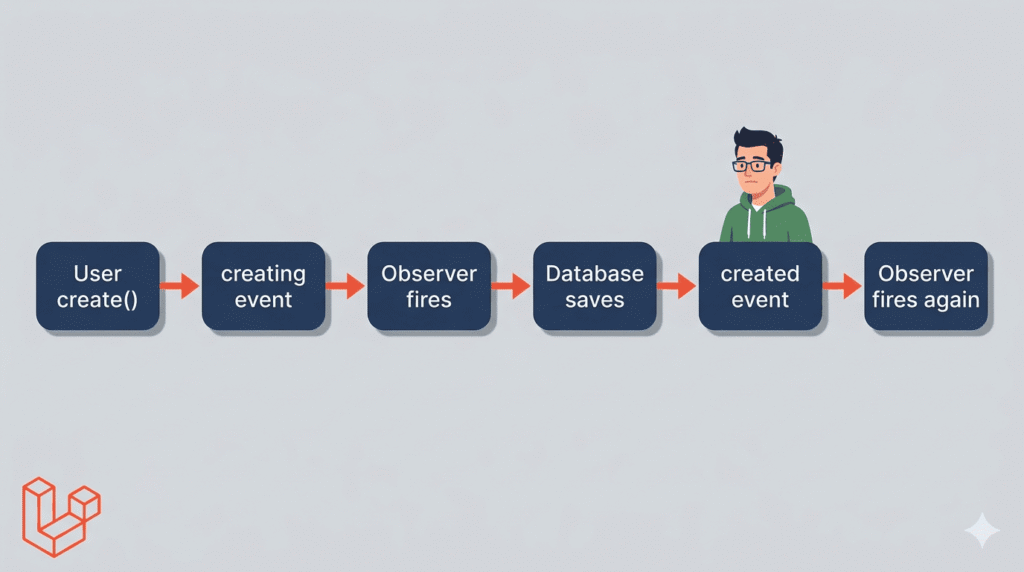
Here is what actually happens under the hood when you call User::create():
User::create($data)
      │
      ▼
Eloquent fires “creating” event
      │
      ▼
UserObserver::creating() runs ← your code here
      │
      ▼
Record is inserted into database
      │
      ▼
Eloquent fires “created” event
      │
      ▼
UserObserver::created() runs ← your code here
      │
      ▼
Execution returns to your controllerYour controller has no idea any of this happened. It just called User::create() and got back a User model. All the side effects — email, roles, logging — were handled automatically.
Why Fat Controllers Are a Ticking Time Bomb
Before we dive into code, let us talk about why fat controllers are genuinely dangerous — not just aesthetically unpleasant.
Problem 1 — Logic Duplication
As your application grows, users get created in more than one place. You might have:
- UserController@store — web registration form
- Api/UserController@store — mobile app API
- AdminController@createUser — admin panel
- ImportUsersCommand — CSV import via CLI
- OAuthController@handleCallback — social login
Every single one of those needs the same post-creation logic. Without observers, you are copying and pasting — or worse, forgetting to add it and shipping bugs.
Problem 2 — Hidden Dependencies
When a new developer joins your team and looks at AdminController@createUser, they see a simple User::create() call. They have no idea a welcome email should be sent. So they do not add it. The user never gets the email. A bug ships silently.
Problem 3 — Testing Becomes a Nightmare
Testing a fat controller means your test has to account for email sending, role assignment, logging, and Slack notifications just to test user creation. You cannot test these things in isolation. Everything is tangled together.
Problem 4 — Controllers Should Not Know This Much
A controller’s job is to take a request, validate it, call the right service or model, and return a response. The moment it is also responsible for sending emails, assigning roles, logging activity, and notifying Slack — it has become something it was never supposed to be.
Creating Your First Observer
Enough theory. Let us build something.
Step 1 — Generate the Observer
$ php artisan make:observer UserObserver --model=UserThis creates app/Observers/UserObserver.php with stubs for the most commonly used events. Here is what you get out of the box:
// app/Observers/UserObserver.php

namespace App\Observers;

use App\Models\User;

class UserObserver
{
    /**
     * Handle the User "created" event.
     */
    public function created(User $user): void
    {
        //
    }

    /**
     * Handle the User "updated" event.
     */
    public function updated(User $user): void
    {
        //
    }

    /**
     * Handle the User "deleted" event.
     */
    public function deleted(User $user): void
    {
        //
    }

    /**
     * Handle the User "restored" event.
     */
    public function restored(User $user): void
    {
        //
    }

    /**
     * Handle the User "force deleted" event.
     */
    public function forceDeleted(User $user): void
    {
        //
    }
}Clean. Simple. Delete the methods you do not need.
Step 2 — Register the Observer
In Laravel 10 and above, register your observers inside the boot() method of AppServiceProvider:
// app/Providers/AppServiceProvider.php

namespace App\Providers;

use App\Models\User;
use App\Observers\UserObserver;
use Illuminate\Support\ServiceProvider;

class AppServiceProvider extends ServiceProvider
{
    public function boot(): void
    {
        User::observe(UserObserver::class);
    }
}Alternatively, if you prefer to keep things at the model level, you can use the ObservedBy attribute directly on the model (Laravel 10+):
// app/Models/User.php

namespace App\Models;

use App\Observers\UserObserver;
use Illuminate\Foundation\Auth\User as Authenticatable;
use Illuminate\Database\Eloquent\Attributes\ObservedBy;

#[ObservedBy([UserObserver::class])]
class User extends Authenticatable
{
    // ...
}Both approaches work perfectly. The attribute approach is more self-documenting — you open the model and immediately see which observers are attached.
Real-World Example — Everything That Happens When a User Registers
Let us take that bloated controller from the beginning and completely fix it using an observer.
Before — The Messy Controller
// app/Http/Controllers/UserController.php

public function store(Request $request): JsonResponse
{
    $user = User::create($request->validated());

    Mail::to($user->email)->send(new WelcomeEmail($user));
    $user->assignRole('subscriber');
    ActivityLog::create(['user_id' => $user->id, 'action' => 'registered']);
    Notification::route('slack', config('services.slack.webhook'))
        ->notify(new NewUserRegistered($user));
    UserSetting::create(['user_id' => $user->id, 'theme' => 'light']);

    return response()->json($user, 201);
}After — The Clean Controller
// app/Http/Controllers/UserController.php

public function store(Request $request): JsonResponse
{
    $user = User::create($request->validated());

    return response()->json($user, 201);
}Two lines. Does exactly what a controller should do.
The Observer Handles Everything Else
// app/Observers/UserObserver.php

namespace App\Observers;

use App\Mail\WelcomeEmail;
use App\Models\User;
use App\Models\UserSetting;
use App\Models\ActivityLog;
use App\Notifications\NewUserRegistered;
use Illuminate\Support\Facades\Mail;
use Illuminate\Support\Facades\Notification;

class UserObserver
{
    /**
     * Runs automatically every time a User is created — anywhere in the app.
     */
    public function created(User $user): void
    {
        // 1. Send welcome email
        Mail::to($user->email)->send(new WelcomeEmail($user));

        // 2. Assign default role
        $user->assignRole('subscriber');

        // 3. Log the registration
        ActivityLog::create([
            'user_id' => $user->id,
            'action'  => 'registered',
        ]);

        // 4. Notify the team on Slack
        Notification::route('slack', config('services.slack.webhook'))
            ->notify(new NewUserRegistered($user));

        // 5. Create default settings
        UserSetting::create([
            'user_id'          => $user->id,
            'theme'            => 'light',
            'notifications_on' => true,
        ]);
    }
}Now every single place in your application that creates a User — the web controller, the API controller, the admin panel, the CSV import command, the OAuth handler — automatically triggers all five of those side effects. Zero duplication. Zero chance of forgetting.
Adding More Lifecycle Logic
Want to clear a cache when a user’s profile is updated? Log when an account is deleted? Restore related data when a soft-deleted user is restored? Just add the corresponding methods:
// app/Observers/UserObserver.php

public function updated(User $user): void
{
    // Clear cached user data when profile changes
    Cache::forget("user_profile_{$user->id}");

    // Log what changed
    ActivityLog::create([
        'user_id' => $user->id,
        'action'  => 'profile_updated',
        'changes' => json_encode($user->getChanges()),
    ]);
}

public function deleted(User $user): void
{
    // Notify the admin team when an account is deleted
    Notification::route('slack', config('services.slack.webhook'))
        ->notify(new UserDeleted($user));

    // Clean up related records
    $user->settings()->delete();
    $user->tokens()->delete();
}

public function restored(User $user): void
{
    // Re-send activation email when account is restored
    Mail::to($user->email)->send(new AccountRestoredEmail($user));
}Every method is focused, readable, and lives in exactly the right place.
Going Further — Delegate to Service Classes
If your observer methods start growing beyond a handful of lines, it is a sign you need a service class. The observer’s job is to be the trigger — not the brain.
Here is how that pattern looks:
// app/Services/UserOnboardingService.php

namespace App\Services;

use App\Mail\WelcomeEmail;
use App\Models\User;
use App\Models\UserSetting;
use App\Models\ActivityLog;
use App\Notifications\NewUserRegistered;
use Illuminate\Support\Facades\Mail;
use Illuminate\Support\Facades\Notification;

class UserOnboardingService
{
    public function handleNewRegistration(User $user): void
    {
        $this->sendWelcomeEmail($user);
        $this->assignDefaultRole($user);
        $this->createDefaultSettings($user);
        $this->logRegistration($user);
        $this->notifyAdminTeam($user);
    }

    private function sendWelcomeEmail(User $user): void
    {
        Mail::to($user->email)->send(new WelcomeEmail($user));
    }

    private function assignDefaultRole(User $user): void
    {
        $user->assignRole('subscriber');
    }

    private function createDefaultSettings(User $user): void
    {
        UserSetting::create([
            'user_id'          => $user->id,
            'theme'            => 'light',
            'notifications_on' => true,
        ]);
    }

    private function logRegistration(User $user): void
    {
        ActivityLog::create([
            'user_id' => $user->id,
            'action'  => 'registered',
        ]);
    }

    private function notifyAdminTeam(User $user): void
    {
        Notification::route('slack', config('services.slack.webhook'))
            ->notify(new NewUserRegistered($user));
    }
}Now your observer becomes beautifully thin:
// app/Observers/UserObserver.php

namespace App\Observers;

use App\Models\User;
use App\Services\UserOnboardingService;

class UserObserver
{
    public function __construct(
        private UserOnboardingService $onboardingService
    ) {}

    public function created(User $user): void
    {
        $this->onboardingService->handleNewRegistration($user);
    }
}The observer uses constructor injection — Laravel’s service container automatically resolves the UserOnboardingService dependency when the observer is instantiated. No manual app() calls needed.
This pattern gives you the best of everything — the observer stays lean and readable, the service class contains all the real logic, the service is independently testable without touching the observer, and you can call the service directly from other places too if needed.
Queuing Observer Logic for Better Performance
Some things you do when a user registers — sending emails, making API calls, processing images — are slow. You do not want these blocking the HTTP response.
The solution is to implement ShouldQueue on your observer:
// app/Observers/UserObserver.php

namespace App\Observers;

use App\Mail\WelcomeEmail;
use App\Models\User;
use Illuminate\Contracts\Queue\ShouldQueue;
use Illuminate\Support\Facades\Mail;

class UserObserver implements ShouldQueue
{
    /**
     * The name of the queue to use.
     */
    public string $queue = 'observers';

    /**
     * The number of seconds before the job should be processed.
     */
    public int $delay = 5;

    public function created(User $user): void
    {
        // This now runs in the background — the HTTP response
        // is returned immediately without waiting for this.
        Mail::to($user->email)->send(new WelcomeEmail($user));
    }
}When you implement ShouldQueue, the observer’s methods are dispatched to your queue instead of running synchronously. The user sees a fast response. The email goes out in the background.
Be careful about database transactions though. If your observer fires inside a transaction that later rolls back, the queued job might try to load a model that no longer exists. Use afterCommit to handle this safely:
// app/Observers/UserObserver.php

class UserObserver implements ShouldQueue
{
    /**
     * Only dispatch observer after the database transaction commits.
     */
    public bool $afterCommit = true;

    public function created(User $user): void
    {
        Mail::to($user->email)->send(new WelcomeEmail($user));
    }
}Observers vs Events and Listeners — Knowing When to Use Which
This is where a lot of developers get confused. Both solve similar problems. Here is when to use each.
Use observers when the logic is directly tied to a single model’s lifecycle, when you want something to happen every time a model event fires, when the logic is relatively contained, and when you want the simplest most readable solution.
// Good use of observer — directly tied to User model events
public function created(User $user): void
{
    Mail::to($user->email)->send(new WelcomeEmail($user));
    $user->assignRole('subscriber');
}Use events and listeners when multiple unrelated things need to happen after one action, when some handlers need to be queued and some do not, when you want to completely decouple the action from its consequences, and when the logic spans multiple models or services.
// Good use of event — OrderPlaced needs to fan out to many systems
event(new OrderPlaced($order));

// Then separate listeners handle each concern independently:
// - SendOrderConfirmationEmail
// - UpdateInventoryLevels
// - NotifyWarehouseTeam
// - GenerateInvoice
// - UpdateCustomerLoyaltyPointsThe Decision Table
| Situation | Observer | Event/Listener |
|---|---|---|
| Send email when user registers | Best choice | Overkill |
| Update a slug when a post title changes | Best choice | Overkill |
| Auto-generate UUID before model saves | Best choice | Overkill |
| Order placed triggers 5+ different systems | Too simple | Best choice |
| Multi-step workflows with conditional branching | Too simple | Best choice |
| Logic needs to run on a specific queue | Works | Works better |
| Need to broadcast events to frontend | Not suitable | Best choice |
Common Mistakes and How to Avoid Them
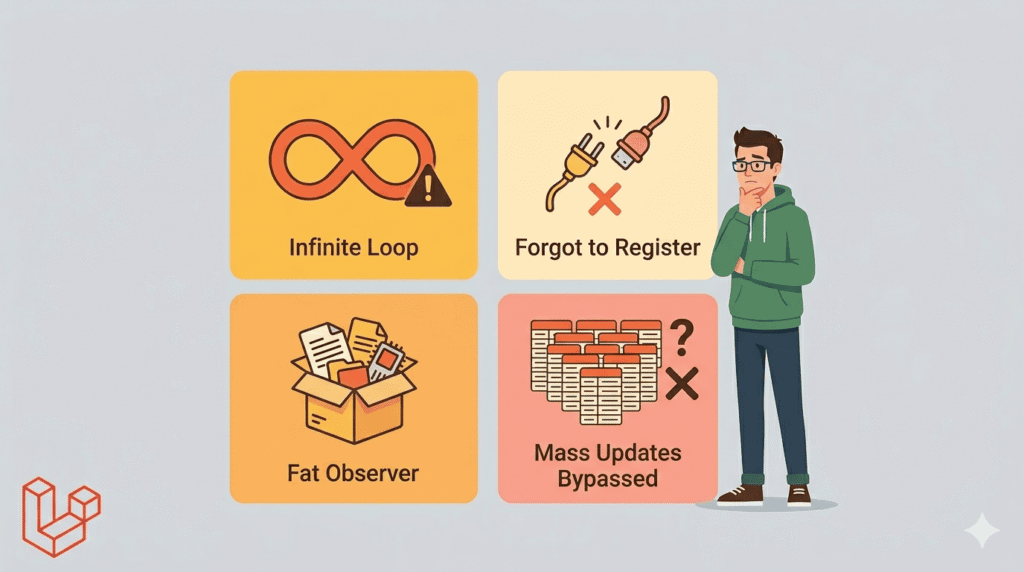
Mistake 1 — The Infinite Loop
This one will ruin your day if you are not careful.
// DON'T DO THIS
public function updated(User $user): void
{
    $user->last_active = now();
    $user->save(); // This triggers "updated" again -> infinite loop!
}The fix is to use updateQuietly(), which skips the observer entirely:
// DO THIS INSTEAD
public function updated(User $user): void
{
    $user->updateQuietly(['last_active' => now()]);
}Or check what actually changed to avoid unnecessary side effects:
public function updated(User $user): void
{
    // Only run if email changed, not on every update
    if ($user->wasChanged('email')) {
        Mail::to($user->email)->send(new EmailChangedNotification($user));
    }
}Mistake 2 — Forgetting to Register
You write a beautiful observer, deploy it, and nothing happens. The welcome emails are not sending. The roles are not assigning. You spend an hour debugging.
The culprit? You forgot to register the observer in AppServiceProvider.
Always double-check:
// app/Providers/AppServiceProvider.php

public function boot(): void
{
    User::observe(UserObserver::class);
    Post::observe(PostObserver::class);
    Order::observe(OrderObserver::class);
}Mistake 3 — Making Observers Too Fat
Observers can suffer from the same problem as controllers if you are not careful. If your created method is 80 lines long — stop. Extract to a service.
// Too fat — this observer is doing too much directly
public function created(User $user): void
{
    // 80 lines of inline logic...
}

// Better — thin observer, fat service
public function created(User $user): void
{
    app(UserOnboardingService::class)->run($user);
}Mistake 4 — Ignoring the saving and saved Events
Many developers only use created and updated. But saving and saved fire for both create and update operations — useful when you have shared logic:
public function saving(User $user): void
{
    // Runs before BOTH create and update
    // Great for normalizing data before any save
    $user->email = strtolower($user->email);
    $user->name  = ucwords($user->name);
}Mistake 5 — Bypassing Observers Without Realizing It
Some Eloquent methods skip observers entirely. Be aware of this:
// These DO fire observers
User::create($data);
$user->save();
$user->update($data);
$user->delete();

// These DO NOT fire observers
User::insert($data);         // mass insert, no observers
User::where(...)->update();  // mass update, no observers
User::where(...)->delete(); // mass delete, no observersIf you use mass operations, you need to handle those side effects manually.
Testing Observers
One of the biggest benefits of observers is how easy they are to test in isolation.
Testing That Observer Logic Fires Correctly
// tests/Unit/Observers/UserObserverTest.php

namespace Tests\Unit\Observers;

use App\Mail\WelcomeEmail;
use App\Models\User;
use Illuminate\Foundation\Testing\RefreshDatabase;
use Illuminate\Support\Facades\Mail;
use Tests\TestCase;

class UserObserverTest extends TestCase
{
    use RefreshDatabase;

    public function test_welcome_email_is_sent_when_user_is_created(): void
    {
        Mail::fake();

        $user = User::factory()->create();

        Mail::assertSent(WelcomeEmail::class, function ($mail) use ($user) {
            return $mail->hasTo($user->email);
        });
    }

    public function test_user_is_assigned_subscriber_role_on_creation(): void
    {
        $user = User::factory()->create();

        $this->assertTrue($user->hasRole('subscriber'));
    }

    public function test_cache_is_cleared_when_user_is_updated(): void
    {
        $user = User::factory()->create();
        Cache::put("user_profile_{$user->id}", 'cached_data');

        $user->update(['name' => 'New Name']);

        $this->assertNull(Cache::get("user_profile_{$user->id}"));
    }
}Disabling Observers During Specific Tests
Sometimes you want to test something that creates a User model but you do not want the observer firing:
public function test_something_unrelated_to_user_observers(): void
{
    $this->withoutEvents();

    $user = User::factory()->create(); // Clean, no side effects

    // rest of your test
}Keep observers focused. One observer per model. Each method does one clearly defined thing. If a method is growing, delegate to a service class.
Use the right event. Do not use created when you mean saving. Each event exists for a reason — use the one that semantically matches what you are doing.
Always handle the wasChanged() check in updated. Not every update needs every side effect. Check $user->wasChanged(’email’) before sending an email change notification.
Name your observers predictably. UserObserver, PostObserver, OrderObserver — keep it obvious. One observer class per model, named after the model.
Document what each observer does. Add a DocBlock comment at the top of each observer class explaining what it manages:
/**
 * Handles all User model lifecycle events.
 *
 * created:  Sends welcome email, assigns default role, creates settings
 * updated:  Clears profile cache, logs changes
 * deleted:  Notifies admin team, cleans up related records
 * restored: Re-sends activation email
 */
class UserObserver
{
    // ...
}Use constructor injection, not app(). Let Laravel’s service container inject your dependencies cleanly:
// Prefer this
public function __construct(
    private UserOnboardingService $onboardingService,
    private ActivityLogger $logger
) {}Your Controllers Deserve Better
Here is the honest truth. Most Laravel developers write fat controllers not because they are lazy — but because it is the path of least resistance. It is easy to just add one more line to store(). And then another. And another.
Before you know it, your controller is doing six things, your logic is duplicated in three places, and a new developer on your team is afraid to touch anything because they do not know what will break.
Laravel Model Observers are the antidote.
They give you a clean, predictable, centralized place to handle everything that should happen when your models change. They enforce the Single Responsibility Principle naturally. They eliminate duplication. They make your code easier to test and easier to understand.
Start with one. Pick the model in your current project that creates the most side effects and move all that logic into an observer. Register it. Run your tests. See how your controller shrinks and your observer grows — in a good, organized, manageable way.
Then keep going. Post. Order. Product. Invoice. Every model that has lifecycle consequences deserves its own observer.
The best Laravel code is not clever code. It is code that anyone on your team can open, understand in 30 seconds, and confidently change. Model Observers are a foundational step toward that goal. Use them.
Leave a Reply