
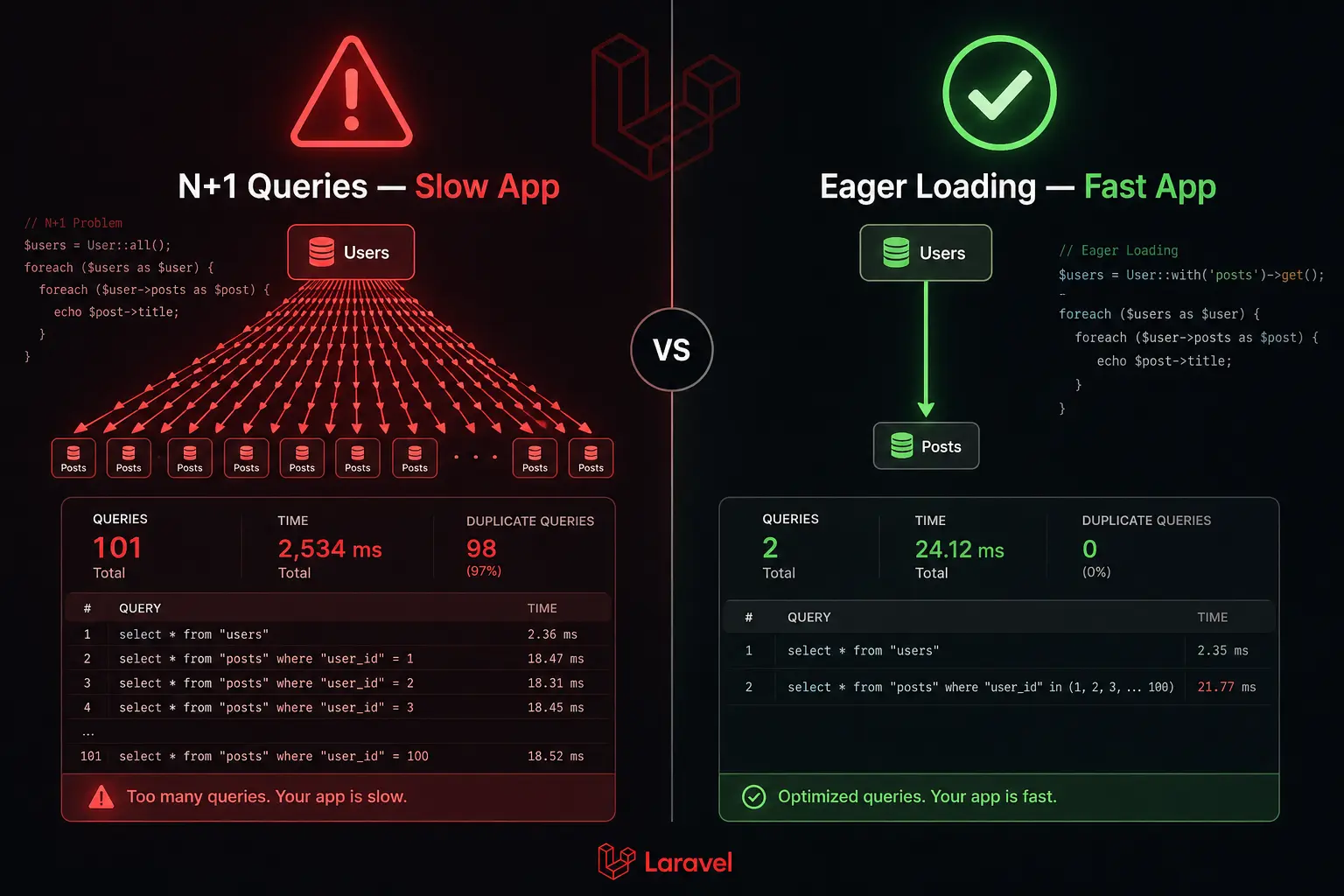
If you have ever built a Laravel app that felt fast during development but crawled in production — Laravel eager loading is probably what you were missing. The N+1 query problem is one of those silent killers. Your code looks perfectly fine. It works. But under the hood, your app is hammering the database with hundreds of unnecessary queries and you have no idea why things are slow.
I’ve been there. Most Laravel developers have. And this article is going to fix that for you, permanently.
Let’s dig in — developer to developer.
What Even Is the N+1 Query Problem?
Let’s say you are building a blog. You have a Post model and each post belongs to a User.
Here’s your model:
// app/Models/Post.php

class Post extends Model
{
    public function user()
    {
        return $this->belongsTo(User::class);
    }
}And here’s where things go wrong. You fetch all posts and loop through them to show the author’s name:
// In your controller
$posts = Post::all();

// In your Blade template
@foreach ($posts as $post)
    <p>{{ $post->title }} — by {{ $post->user->name }}</p>
@endforeachLooks clean, right? Nothing obviously wrong here.
But here is what actually happens in the database:
-- Query 1: Fetch all posts
SELECT * FROM posts;

-- Then for EACH post, Laravel fires a separate query:
SELECT * FROM users WHERE id = 1;
SELECT * FROM users WHERE id = 2;
SELECT * FROM users WHERE id = 3;
-- ... and so on for every single postIf you have 100 posts, you just fired 101 queries. That’s the N+1 problem — 1 query to get the list, then N more queries for each item in that list.
With 1,000 posts? 1,001 queries. Your database is not happy. Your users are not happy. Your server bill is definitely not happy.
How do you spot it?
Install Laravel Debugbar or use Telescope. You’ll see the query count spike when you’re unknowingly hitting the N+1 problem.
bash
composer require barryvdh/laravel-debugbar --devOnce enabled, you’ll see a little toolbar at the bottom of your app showing every query fired per page load. When you see 80+ queries on a simple list page, that’s your N+1 alarm bell.
How Laravel Eager Loading Fixes It with with()
The fix is one word: with().
Eager loading tells Laravel — “hey, when you fetch these posts, go ahead and fetch the related users at the same time, in a single efficient query.”
Here’s the fixed version:
// Before (N+1 problem)
$posts = Post::all();

// After (Eager Loading — fixed!)
$posts = Post::with('user')->get();That’s it. One change. Now here’s what the database sees:
-- Query 1: Fetch all posts
SELECT * FROM posts;

-- Query 2: Fetch all related users IN ONE GO
SELECT * FROM users WHERE id IN (1, 2, 3, 4, 5);Always just 2 queries. No matter if you have 10 posts or 10,000 posts.
Laravel handles the matching internally — it maps each post to its user using the foreign key. You don’t have to change anything in your Blade template. It just works.
Eager loading multiple relationships
You’re not limited to one relationship. You can eager load several at once:
$posts = Post::with(['user', 'category', 'tags'])->get();Now all three relationships are loaded in 3 extra queries total (one per relationship), instead of 3 × N queries. Huge difference at scale.
Constraining eager loads
Sometimes you don’t want ALL the data from the related model. You can add constraints to the eager load:
$posts = Post::with(['comments' => function ($query) {
    $query->where('approved', true)->orderBy('created_at', 'desc');
}])->get();This tells Laravel: “Load the comments for each post, but only the approved ones, sorted by newest first.” Clean and efficient.
Lazy Eager Loading with load()
Sometimes you don’t know upfront whether you’ll need a relationship. Maybe you’re fetching posts in one place and only conditionally need the user data later depending on some logic.
That’s where load() comes in — it’s eager loading, but applied after the initial query.
// Fetch posts first
$posts = Post::all();

// Decide later that you need users too
if ($someCondition) {
    $posts->load('user');
}This fires the efficient batched query for users only when needed — still avoiding N+1, just at a later point.
You can also call load() on a single model instance:
$post = Post::find(1);

// Load the relationship later
$post->load('comments');load() vs with() — which one to use?
| Situation | Use |
|---|---|
| You know you’ll need the relationship | with() |
| You might need it conditionally | load() |
| Already fetched, need to add relationship | load() |
Both prevent N+1. The difference is just timing.
Nested Eager Loading — Relationships of Relationships
Here’s where it gets really powerful. What if your relationship has its own relationship?
Example: A Post has many Comments, and each Comment belongs to a User.
// app/Models/Post.php
public function comments()
{
    return $this->hasMany(Comment::class);
}

// app/Models/Comment.php
public function user()
{
    return $this->belongsTo(User::class);
}Now in your blade, you want to show each post’s comments along with the commenter’s name:
// Without nested eager loading — N+1 nightmare
$posts = Post::with('comments')->get();

// In Blade
@foreach ($posts as $post)
    @foreach ($post->comments as $comment)
        {{ $comment->user->name }}  {{-- Fires a query for EACH comment --}}
    @endforeach
@endforeachThis still has an N+1 inside the comments loop. You loaded comments eagerly, but not the users on those comments.
The fix — dot notation for nested eager loading:
$posts = Post::with('comments.user')->get();The dot notation tells Laravel to go one level deeper. Now it loads:
- All posts
- All comments for those posts
- All users for those comments
All in 3 queries. Not 1 + N + (N × M).
You can go as deep as you need:
// Three levels deep
$posts = Post::with('comments.user.profile')->get();

// Multiple nested relationships
$posts = Post::with([
    'comments.user',
    'category.parent',
])->get();Just be careful not to go overboard — deeply nested eager loads can still pull a lot of data. Load only what you actually use on the page.
Real-World Example — Posts, Comments, and Users
Let’s put it all together with a real-world blog scenario. You’re building a page that shows:
- A list of published posts
- Each post’s author name and avatar
- The first 3 approved comments per post
- Each commenter’s name
Step 1 — Set up your models:
// app/Models/Post.php
class Post extends Model
{
    public function user()
    {
        return $this->belongsTo(User::class);
    }

    public function comments()
    {
        return $this->hasMany(Comment::class);
    }

    public function approvedComments()
    {
        return $this->hasMany(Comment::class)
                    ->where('approved', true)
                    ->latest()
                    ->limit(3);
    }
}

// app/Models/Comment.php
class Comment extends Model
{
    public function user()
    {
        return $this->belongsTo(User::class);
    }
}Step 2 — Eager load everything in your controller:
// app/Http/Controllers/PostController.php

public function index()
{
    $posts = Post::with([
            'user',                  // Post author
            'approvedComments.user'  // Top 3 comments + their authors
        ])
        ->where('status', 'published')
        ->latest()
        ->paginate(10);

    return view('posts.index', compact('posts'));
}Step 3 — Use it cleanly in Blade:
{{-- resources/views/posts/index.blade.php --}}

@foreach ($posts as $post)
    <article>
        <h2>{{ $post->title }}</h2>

        <div class="author">
            <img src="{{ $post->user->avatar }}" alt="{{ $post->user->name }}">
            <span>By {{ $post->user->name }}</span>
        </div>

        <div class="comments">
            @foreach ($post->approvedComments as $comment)
                <div class="comment">
                    <strong>{{ $comment->user->name }}</strong>
                    <p>{{ $comment->body }}</p>
                </div>
            @endforeach
        </div>
    </article>
@endforeach

{{ $posts->links() }}How many queries does this fire?
Exactly 3 queries — no matter how many posts are on the page:=
-- 1. Get paginated published posts
SELECT * FROM posts WHERE status = 'published' ORDER BY created_at DESC LIMIT 10;

-- 2. Get all authors for those posts
SELECT * FROM users WHERE id IN (1, 4, 7, 12, ...);

-- 3. Get approved comments + their users (via nested eager load)
SELECT * FROM comments WHERE post_id IN (101, 102, 103, ...) AND approved = 1;
SELECT * FROM users WHERE id IN (5, 8, 9, 23, ...);Without eager loading, that same page could fire 50–150+ queries depending on the data. Eager loading isn’t just a good practice — it’s the difference between a fast app and a broken one at scale.
Quick Reference Cheatsheet
// Basic eager loading
Post::with('user')->get();

// Multiple relationships
Post::with(['user', 'tags', 'category'])->get();

// Nested (dot notation)
Post::with('comments.user')->get();

// With constraints
Post::with(['comments' => fn($q) => $q->where('approved', true)])->get();

// Lazy eager loading (after query)
$posts = Post::all();
$posts->load('user');

// Lazy eager on single model
$post = Post::find(1);
$post->load('comments.user');

// Combine paginate + eager load
Post::with('user')->paginate(15);Wrapping Up
The N+1 query problem is one of those issues that will quietly destroy your app’s performance while your code looks perfectly fine. The fix — Laravel eager loading with with() — is so simple that once you know it, you’ll never go back.
Here’s the core mindset shift to take away: every time you loop through a collection and access a relationship inside that loop, ask yourself — did I eager load this? If the answer is no, fix it with with() before it hits production.
Use with() when you know you’ll need a relationship. Use load() when you find out later. Use dot notation for nested relationships. Constrain your eager loads to avoid pulling unnecessary data.
That’s genuinely all there is to it. Your database will thank you. Your users will thank you. And six-months-from-now you will thank you.
Now go open your existing controllers and run them through Debugbar. I guarantee you’ll find a few N+1 problems hiding in plain sight. 🔍
Have questions or a tricky relationship chain you’re trying to eager load? Drop it in the comments — happy to help you work through it.
Leave a Reply