
You’ve been there. A product API needs filtering. Simple enough. You open the controller, write a quick if ($request->has('status')), and move on. Done in five minutes. But that’s exactly the trap that spatie/laravel-query-builder was built to save you from.
Then the PM wants sorting. Then the frontend needs to filter by category AND status. Then someone asks for date range filtering. Then relationships. Then you look at your controller three weeks later and it’s 80 lines of nested if-statements, and you genuinely can’t remember what half of it does.
This is the Laravel API filtering trap. And almost every developer has fallen into it at least once.
// The code we've all written and regretted
public function index(Request $request)
{
    $query = Product::query();

    if ($request->has('status')) {
        $query->where('status', $request->status);
    }

    if ($request->has('category')) {
        $query->where('category_id', $request->category);
    }

    if ($request->has('search')) {
        $query->where('name', 'like', '%' . $request->search . '%');
    }

    if ($request->has('sort')) {
        $query->orderBy($request->sort, $request->get('direction', 'asc'));
    }

    if ($request->has('include') && $request->include === 'reviews') {
        $query->with('reviews');
    }

    return ProductResource::collection($query->paginate());
}Look at that. And this is still a relatively tame example. In the real world, this function doubles in size, gets copy-pasted into three other controllers with slight variations, and becomes the part of the codebase nobody wants to touch.
There’s a better way. Let’s talk about it.
The If-Statement Nightmare We’ve All Lived Through
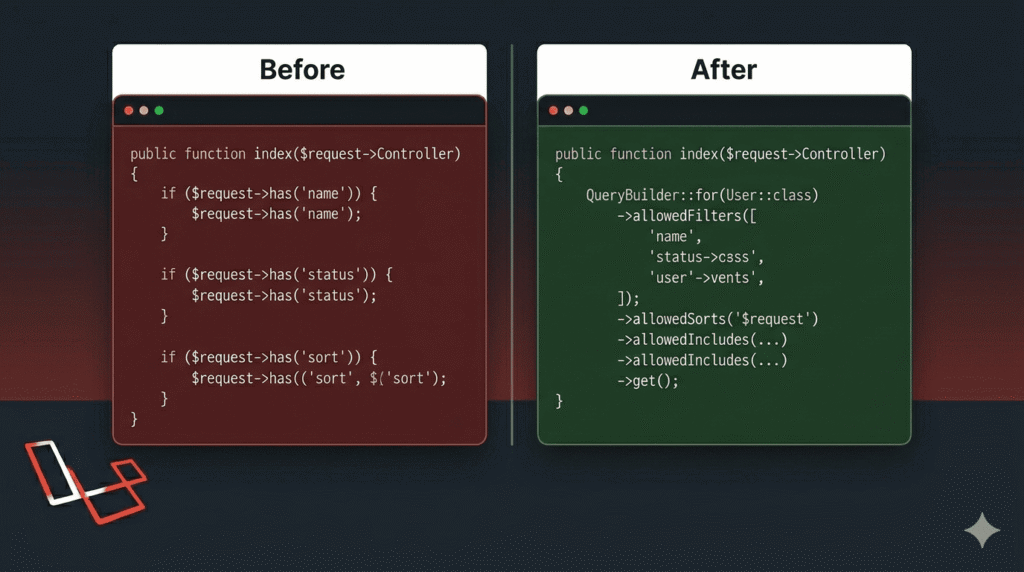
The problem isn’t that you wrote bad code. The problem is that manual API filtering has no natural stopping point. Every new filter requirement means a new if-block. Every new sort field means another condition. Every relationship someone wants included is another branch.
Here’s what a slightly more real-world controller actually looks like after a few sprints:
public function index(Request $request)
{
    $query = Product::query();

    if ($request->filled('status')) {
        $query->where('status', $request->status);
    }

    if ($request->filled('category_id')) {
        $query->where('category_id', $request->category_id);
    }

    if ($request->filled('min_price')) {
        $query->where('price', '>=', $request->min_price);
    }

    if ($request->filled('max_price')) {
        $query->where('price', '<=', $request->max_price);
    }

    if ($request->filled('search')) {
        $query->where(function ($q) use ($request) {
            $q->where('name', 'like', '%' . $request->search . '%')
              ->orWhere('description', 'like', '%' . $request->search . '%');
        });
    }

    if ($request->filled('sort_by') && in_array($request->sort_by, ['name', 'price', 'created_at'])) {
        $direction = $request->get('sort_dir', 'asc');
        $query->orderBy($request->sort_by, $direction);
    }

    if ($request->filled('include')) {
        $includes = explode(',', $request->include);
        $allowed  = ['reviews', 'category', 'tags'];
        $safe     = array_intersect($includes, $allowed);
        $query->with($safe);
    }

    return ProductResource::collection($query->paginate());
}This is 45 lines for one endpoint. It handles maybe six filters. And it has real problems:
- It grows forever. Every sprint adds more conditions, nobody removes old ones.
- It’s duplicated. Your
OrderController,UserController, andPostControllerall have the same shape of code with slightly different field names. - It’s a security risk if you’re not careful. One missing whitelist check and you’re letting users sort or filter by columns they shouldn’t touch.
- New developers have to read every line to understand what the endpoint actually supports.
This kind of code is technically correct and practically exhausting.
Enter spatie/laravel-query-builder
Spatie is the team behind some of the most widely used Laravel packages out there — laravel-permission, laravel-medialibrary, laravel-activitylog. They write packages because they keep solving the same problems across projects, and they solve them properly.
spatie/laravel-query-builder exists because API filtering is a solved problem. The team at Spatie built spatie/laravel-query-builder because they kept solving the same filtering problem across every project — and decided to solve it properly, once. You don’t need custom logic every time. You need a consistent, secure, expressive way to translate query string parameters into Eloquent queries. That’s exactly what spatie/laravel-query-builder does.
Install it with:
composer require spatie/laravel-query-builderNo config file needed to get started. Laravel auto-discovers the service provider. You’re ready to go.
Setting Up Your First Filterable API
Let’s say you have a Product model with these columns: id, name, description, price, status, category_id, created_at.
Your ProductController before was 45 lines. Here’s what it looks like now:
use Spatie\QueryBuilder\QueryBuilder;
use Spatie\QueryBuilder\AllowedFilter;

public function index()
{
    $products = QueryBuilder::for(Product::class)
        ->allowedFilters([
            'status',
            'category_id',
            AllowedFilter::partial('search', 'name'),
        ])
        ->allowedSorts(['name', 'price', 'created_at'])
        ->allowedIncludes(['reviews', 'category', 'tags'])
        ->paginate();

    return ProductResource::collection($products);
}
```

That's it. That's the whole controller method.

Now your frontend or API consumer can do this:
```
GET /api/products?filter[status]=active&filter[category_id]=3&sort=-price&include=reviewsAnd it just works. Filters applied, sorted by price descending (the - prefix means descending), reviews eager loaded — all without a single if-statement.
The package reads the query string, validates it against your whitelist, and builds the Eloquent query for you. Anything not in your allowed lists gets silently ignored — which is actually the secure behavior you want.
Sorting Without the Headache
Sorting is where manual code gets brittle fast. You have to whitelist fields manually, handle the direction, and make sure nobody passes a raw column name you didn’t intend to expose.
With the package, you just declare what’s sortable:
QueryBuilder::for(Product::class)
    ->allowedSorts(['name', 'price', 'created_at'])
    ->paginate();

# Then the API consumer controls direction through the URL:

# Sort by price, lowest first
GET /api/products?sort=price

# Sort by price, highest first
GET /api/products?sort=-price

# Sort by name alphabetically
GET /api/products?sort=name

# Sort by newest first
GET /api/products?sort=-created_atThe - prefix convention is clean and predictable. Frontend developers learn it once and it works the same everywhere across your API. No more ?sort_by=price&sort_dir=desc inconsistencies between endpoints.
Including Relationships on Demand
This is the feature that genuinely changes how you design API responses.
Instead of always returning eager-loaded relationships (wasteful) or making the frontend hit multiple endpoints (painful), you let the consumer ask for exactly what they need.
QueryBuilder::for(Post::class)
    ->allowedIncludes(['author', 'comments', 'tags', 'comments.author'])
    ->paginate();


# The API request looks like this:

GET /api/posts?include=author,commentsAnd the JSON response includes those relationships automatically:
{
  "data": [
    {
      "id": 1,
      "title": "Getting Started with Laravel",
      "body": "...",
      "author": {
        "id": 4,
        "name": "Sarah Conor",
        "email": "sarah@example.com"
      },
      "comments": [
        {
          "id": 12,
          "body": "Great post!",
          "created_at": "2024-11-01"
        }
      ]
    }
  ]
}Notice comments.author in the allowedIncludes array — nested relationships work too. A single API endpoint can serve a lightweight list view and a full detail view just by changing the include parameter. Your mobile app asks for minimal data. Your dashboard asks for everything. Same endpoint, no extra code.
This is something frontend developers immediately appreciate once they see it.
Advanced Filters — Scopes, Exact, Partial, and Custom
The package ships with several filter types that cover the majority of real-world cases.
Exact filter — strict equality match, the default:
AllowedFilter::exact('status')
// WHERE status = 'active'Partial filter — LIKE query, useful for search:
AllowedFilter::partial('name')
// WHERE name LIKE '%search term%'Scope filter — delegates to an Eloquent scope on your model:
// In your filter definition
AllowedFilter::scope('price_between')

// In your Product model
public function scopePriceBetween(Builder $query, array $range): Builder
{
    return $query->whereBetween('price', [$range[0], $range[1]]);
}


# Request:

GET /api/products?filter[price_between][0]=100&filter[price_between][1]=500When none of these cover your use case, you can write a fully custom filter class:
use Spatie\QueryBuilder\Filters\Filter;
use Illuminate\Database\Eloquent\Builder;

class FiltersProductByAvailability implements Filter
{
    public function __invoke(Builder $query, $value, string $property): Builder
    {
        return $query
            ->where('status', 'active')
            ->where('stock', '>', 0)
            ->when($value === 'featured', fn($q) => $q->where('is_featured', true));
    }
}Then use it like this:
AllowedFilter::custom('availability', new FiltersProductByAvailability)The custom filter class approach keeps complex logic out of your controller entirely. One class, one responsibility, easy to test.
Why This Package Saves Real Hours on Real Projects
Imagine your PM messages you on a Tuesday morning: “Can we add three new filter options to the product listing API? The client wants to filter by tag, by date range, and by whether a product is featured. Oh, and the mobile team needs it by end of day.”
Before this package, that’s a decent chunk of work. Open the controller. Add three if-blocks. Handle the date range edge cases. Whitelist the new sort options. Don’t break the existing filters. Write tests for each new condition. Hope you didn’t miss anything.
After this package, you add two lines to your allowedFilters array, write one scope on the model, and you’re done. The controller doesn’t change shape. The existing filters keep working. The new filters are tested the same way as the rest.
->allowedFilters([
    'status',
    'category_id',
    AllowedFilter::partial('search', 'name'),
    AllowedFilter::exact('is_featured'),         // new
    AllowedFilter::scope('created_between'),      // new
    AllowedFilter::scope('has_tag'),              // new
])That’s the entire change to the controller. Three new capabilities, three lines.
There’s also a team benefit that’s easy to overlook. When a new developer joins and opens a controller using this package, they can read the allowedFilters, allowedSorts, and allowedIncludes arrays like a table of contents for the API. They know exactly what the endpoint supports without reading a single if-block. That’s documentation you didn’t have to write.
After Using This in My Projects, Here’s What I Noticed
When I first used spatie/laravel-query-builder in a mid-sized SaaS project, the immediate win was obvious — the controllers got smaller. But the real benefit showed up weeks later when the requirements changed (as they always do).
Adding a new filter used to mean: find the right if block, copy the pattern, hope you don’t break something. With this package, it meant adding one word to an array. Done. No ripple effects.
I also noticed my code reviews got faster. Reviewers could instantly see which filters were allowed just by scanning the allowedFilters() call. No hunting through conditionals.
If you’re building any kind of data-heavy API — user management, product catalog, reporting dashboards — this package will pay for its “learning cost” in the first hour.
A Few Things to Watch Out For
This isn’t a sales pitch, so let’s be honest about a couple of things.
Always be explicit with your whitelists. The package is secure by default — anything not in your allowed lists is ignored. But that means you need to be deliberate. Don’t use broad or dynamic whitelists. List your filters explicitly. If you allow AllowedFilter::exact('user_id') on an endpoint that shouldn’t expose cross-user data, that’s your oversight, not the package’s fault.
Watch your includes on large datasets. allowedIncludes makes it easy to eager load relationships, but easy isn’t always free. If someone includes a relationship that pulls 10,000 related records, your API response will be slow and large. Apply pagination sensibly, and consider whether certain includes should be restricted to authenticated or admin users.
The query string format is opinionated. The package follows the JSON API spec for filter parameters — ?filter[status]=active rather than ?status=active. If you have an existing API with consumers already using flat query strings, migrating cleanly takes some thought. For greenfield projects, this is a non-issue.
Building clean Laravel APIs doesn’t have to mean writing endless if statements. spatie/laravel-query-builder gives you a structured, readable, and secure way to handle filtering, sorting, and relationship loading — all driven by URL query parameters.
It’s one of those tools that makes you wonder how you managed without it.
Install it, try it on your next endpoint, and see how much lighter your controller feels. And if you’re already using it — drop a comment with how you’re using it in production. I’m always curious how others structure their API filters.
The best Laravel APIs are not built with clever if-statements. They are built with clear intentions. One glance at allowedFilters, allowedSorts, and allowedIncludes — and any developer knows exactly what the endpoint does. That is the code worth writing. Ship it.
Leave a Reply