
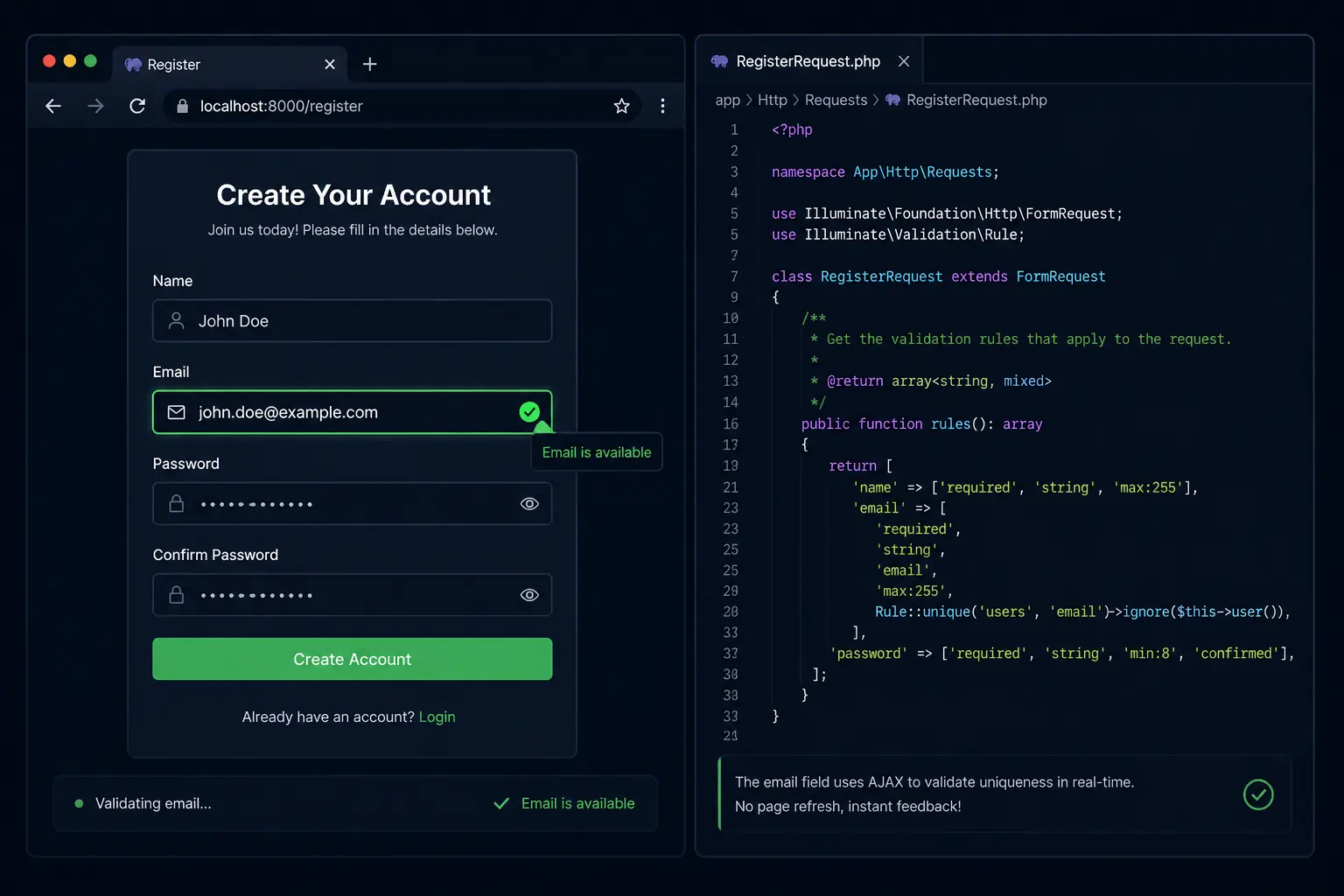
If you’ve been building Laravel apps for a while, you already know how good Laravel Precognition is at keeping your validation logic clean and server-side. But what if users could see validation errors as they type — without submitting the form, without JavaScript rewrites, and without duplicating a single validation rule? That’s exactly what Laravel Precognition does, and honestly, it’s one of those features that makes you wonder how you lived without it.
In this article, we’ll walk through everything you need to know about Laravel Precognition — how it works under the hood, how to set it up from scratch, and how to build a real-world registration form with live inline validation. No fluff, just code and clarity.
What is Laravel Precognition and Why Should You Care?
Think about the classic form validation flow: user fills out a form → hits submit → Laravel validates → returns errors → user fixes them → submits again. It works. But it’s clunky, and users don’t love it.
The better experience? Errors show up right as the user finishes typing each field. Email already taken? They find out immediately. Password too short? Flagged before they even reach the submit button.
The old way to achieve this was to write validation logic twice — once on the backend in PHP, and once on the frontend in JavaScript. That’s a maintenance headache waiting to happen.
Laravel Precognition solves this cleanly.
When the frontend sends a “precognitive request,” Laravel runs the full middleware stack and validates the form request — but it stops before executing the controller method. No database writes, no side effects, no actual processing. Just validation feedback, sent back to the browser in real time.
Here’s what makes it special:
- Single source of truth — your validation rules live only in your Laravel Form Request class
- No duplicate logic — the frontend helper talks directly to your backend validation
- Works with Vue, React, Alpine.js, and Inertia.js — official packages for each
- Debounced by default — it doesn’t fire on every single keystroke, just when the user pauses
How Laravel Precognition Works Under the Hood
Let me show you the request lifecycle so it clicks properly.
When you type into a Precognition-powered field, the frontend helper sends a regular HTTP POST (or PUT/PATCH) request to your route, but with a special header attached:
Precognition: trueOn the backend, the HandlePrecognitiveRequests middleware intercepts this. It checks for that header, runs your middleware stack, resolves your Form Request (which triggers validation), and then stops execution before your controller method runs. The response back to the browser contains just the validation result — success or errors.
No records created. No emails sent. No side effects. Just validation.
If the request is not precognitive (i.e., a real form submission), everything runs normally as it always did.
Step-by-Step Setup
Let’s build this from scratch. We’ll use a registration form as our real-world example — name, email, and password with live validation.
Step 1 — Create Your Form Request
This is where your validation rules live. One place, forever.
php artisan make:request StoreUserRequestOpen the generated file at app/Http/Requests/StoreUserRequest.php and define your rules:
namespace App\Http\Requests;

use Illuminate\Foundation\Http\FormRequest;

class StoreUserRequest extends FormRequest
{
    public function authorize(): bool
    {
        return true;
    }

    public function rules(): array
    {
        return [
            'name'     => ['required', 'string', 'min:2', 'max:100'],
            'email'    => ['required', 'email', 'unique:users,email'],
            'password' => ['required', 'string', 'min:8', 'confirmed'],
        ];
    }
}The unique:users,email rule is a great test case here — it actually hits the database to check for duplicates, and Precognition handles it perfectly.
Step 2 — Add the Middleware to Your Route
Open your routes/web.php and add the HandlePrecognitiveRequests middleware to your registration route:
use App\Http\Requests\StoreUserRequest;
use Illuminate\Foundation\Http\Middleware\HandlePrecognitiveRequests;

Route::post('/register', function (StoreUserRequest $request) {
    // Create the user — this only runs on real submissions
    $user = \App\Models\User::create([
        'name'     => $request->name,
        'email'    => $request->email,
        'password' => bcrypt($request->password),
    ]);

    return redirect('/dashboard')->with('success', 'Welcome aboard!');
})->middleware([HandlePrecognitiveRequests::class]);That’s the entire backend setup. Seriously.
Step 3 — Install the Frontend Helper
Now install the appropriate Precognition frontend package. We’ll use the vanilla JavaScript version here (works great with Alpine.js and plain Blade):
npm install laravel-precognition-vanillaIf you’re on Vue, use this instead:
npm install laravel-precognition-vueAnd for React:
npm install laravel-precognition-reactAdding Real-Time Validation to a Form
Here’s where it gets fun. Let’s wire up the registration form with Alpine.js and the vanilla Precognition helper in a Blade template.
Your Blade Template
<!DOCTYPE html>
<html lang="en">
<head>
    <meta charset="UTF-8">
    <title>Register</title>
    @vite(['resources/css/app.css', 'resources/js/app.js'])
</head>
<body>
    <div x-data="registrationForm()" class="max-w-md mx-auto mt-10 p-6 bg-white shadow rounded">
        <h2 class="text-xl font-bold mb-6">Create your account</h2>

        <div class="mb-4">
            <label>Name</label>
            <input
                type="text"
                x-model="form.name"
                @change="form.validate('name')"
                class="w-full border rounded px-3 py-2"
            />
            <p x-show="form.invalid('name')" x-text="form.errors.name" class="text-red-500 text-sm mt-1"></p>
            <p x-show="form.valid('name')" class="text-green-500 text-sm mt-1">✓ Looks good!</p>
        </div>

        <div class="mb-4">
            <label>Email</label>
            <input
                type="email"
                x-model="form.email"
                @change="form.validate('email')"
                class="w-full border rounded px-3 py-2"
            />
            <p x-show="form.invalid('email')" x-text="form.errors.email" class="text-red-500 text-sm mt-1"></p>
            <p x-show="form.valid('email')" class="text-green-500 text-sm mt-1">✓ Email is available!</p>
        </div>

        <div class="mb-4">
            <label>Password</label>
            <input
                type="password"
                x-model="form.password"
                @change="form.validate('password')"
                class="w-full border rounded px-3 py-2"
            />
            <p x-show="form.invalid('password')" x-text="form.errors.password" class="text-red-500 text-sm mt-1"></p>
        </div>

        <div class="mb-4">
            <label>Confirm Password</label>
            <input
                type="password"
                x-model="form.password_confirmation"
                @change="form.validate('password_confirmation')"
                class="w-full border rounded px-3 py-2"
            />
            <p x-show="form.invalid('password_confirmation')" x-text="form.errors.password_confirmation" class="text-red-500 text-sm mt-1"></p>
        </div>

        <button
            @click="submit"
            :disabled="form.processing"
            class="w-full bg-blue-600 text-white py-2 rounded hover:bg-blue-700 disabled:opacity-50"
        >
            <span x-text="form.processing ? 'Creating account...' : 'Register'"></span>
        </button>
    </div>
</body>
</html>Your Alpine.js Component (in resources/js/app.js)
import { createForm } from 'laravel-precognition-vanilla';

window.registrationForm = function () {
    return {
        form: createForm('post', '/register', {
            name: '',
            email: '',
            password: '',
            password_confirmation: '',
        }),

        submit() {
            this.form.submit()
                .then(() => {
                    window.location = '/dashboard';
                })
                .catch(() => {
                    console.error('Submission failed.');
                });
        }
    };
};That’s it. The createForm function handles all the heavy lifting — sending debounced precognitive requests, tracking validation state per field, and storing errors in form.errors.
Showing Inline Validation Errors as the User Types
The Precognition form helper gives you a clean API to work with:
| Method / Property | What it does |
|---|---|
form.validate('field') | Sends a precognitive request for this field |
form.errors.fieldName | The error message for a field (if any) |
form.invalid('field') | Returns true if the field has an error |
form.valid('field') | Returns true if field passed validation |
form.processing | true while a real submission is in progress |
form.reset() | Clears all form data and errors |
form.forgetError('field') | Clears the error for a specific field |
A few things worth knowing:
Debouncing is built in. By default, Precognition waits a short period after the user stops typing before firing the request. You can configure this if needed:
form.setValidationTimeout(600); // 600ms debounceValid/invalid state only appears after interaction. A field won’t show as valid or invalid until the user has actually changed it and a response has come back. This is the right UX behavior — you don’t want red errors on untouched fields.
Clearing errors manually. Useful when a file input changes:
form.avatar = e.target.files[0];
form.forgetError('avatar');Real-World Example: Registration Form with Live Validation
Let’s put together the complete backend side to make the example above fully functional.
Migration (if you don’t have a users table already)
php artisan make:migration create_users_table// database/migrations/xxxx_create_users_table.php
Schema::create('users', function (Blueprint $table) {
$table->id();
$table->string('name');
$table->string('email')->unique();
$table->string('password');
$table->timestamps();
});php artisan migrateUser Model
namespace App\Models;

use Illuminate\Foundation\Auth\User as Authenticatable;

class User extends Authenticatable
{
    protected $fillable = ['name', 'email', 'password'];
}The Full Route
use App\Http\Requests\StoreUserRequest;
use Illuminate\Foundation\Http\Middleware\HandlePrecognitiveRequests;
use App\Models\User;

Route::get('/register', fn() => view('register'));

Route::post('/register', function (StoreUserRequest $request) {
    $user = User::create([
        'name'     => $request->name,
        'email'    => $request->email,
        'password' => bcrypt($request->password),
    ]);

    auth()->login($user);

    return redirect('/dashboard');
})->middleware([HandlePrecognitiveRequests::class]);Now when a user types their email, Precognition fires a request to /register with the Precognition: true header. Laravel runs the StoreUserRequest validation (including the unique:users,email database check) and returns the result. The user sees “Email is already taken” right in the form — before they ever click submit.
Tips You’ll Actually Use
Use isPrecognitive() to skip side effects. Sometimes you might have code in your Form Request that sends a confirmation email or logs an action. You don’t want that firing on every keystroke. Check for it:
public function withValidator($validator): void
{
    if ($this->isPrecognitive()) {
        return; // Skip side effects during live validation
    }

    // Do your thing here (send email, log, etc.)
}Validate multiple fields at once. Useful in multi-step forms:
form.validate({
    only: ['name', 'email'],
    onSuccess: () => goToNextStep(),
    onValidationError: () => console.log('Fix the errors first'),
});Precognition works with Inertia too. As of Inertia 2.3, Precognition is built-in. Install laravel-precognition-vue-inertia or laravel-precognition-react-inertia and the useForm helper integrates directly with Inertia’s routing. No extra config needed.
When Should You Use Precognition?
Laravel Precognition shines in situations where:
- You have complex server-side validation — uniqueness checks, existence checks, conditional rules that depend on the database
- You’re building registration or checkout forms — high-stakes forms where user frustration is expensive
- You want a professional UX without building a separate frontend validation library
- You’re already using Alpine.js or Livewire — Precognition slots in cleanly without fighting your stack
It’s not always necessary for simple forms with basic required/length rules where client-side validation is fine. But for anything that talks to the database or has business logic validation, Precognition is the right call.
Wrapping Up
Laravel Precognition is one of those features that’s embarrassingly easy to use once you understand what it’s doing. You write your Form Request once, add a single middleware, install an npm package, and suddenly your forms feel modern and responsive — without touching a single validation rule twice.
The developer experience is clean. The user experience is better. And your codebase stays simple.
If you’re building any form that does real validation beyond required and max, give Precognition a shot. You’ll probably wonder why you waited.
Official Resources:
Found a bug in the code examples or want to suggest a topic for the next article? Reach out — I’m always happy to improve things based on what you actually need.
Leave a Reply