
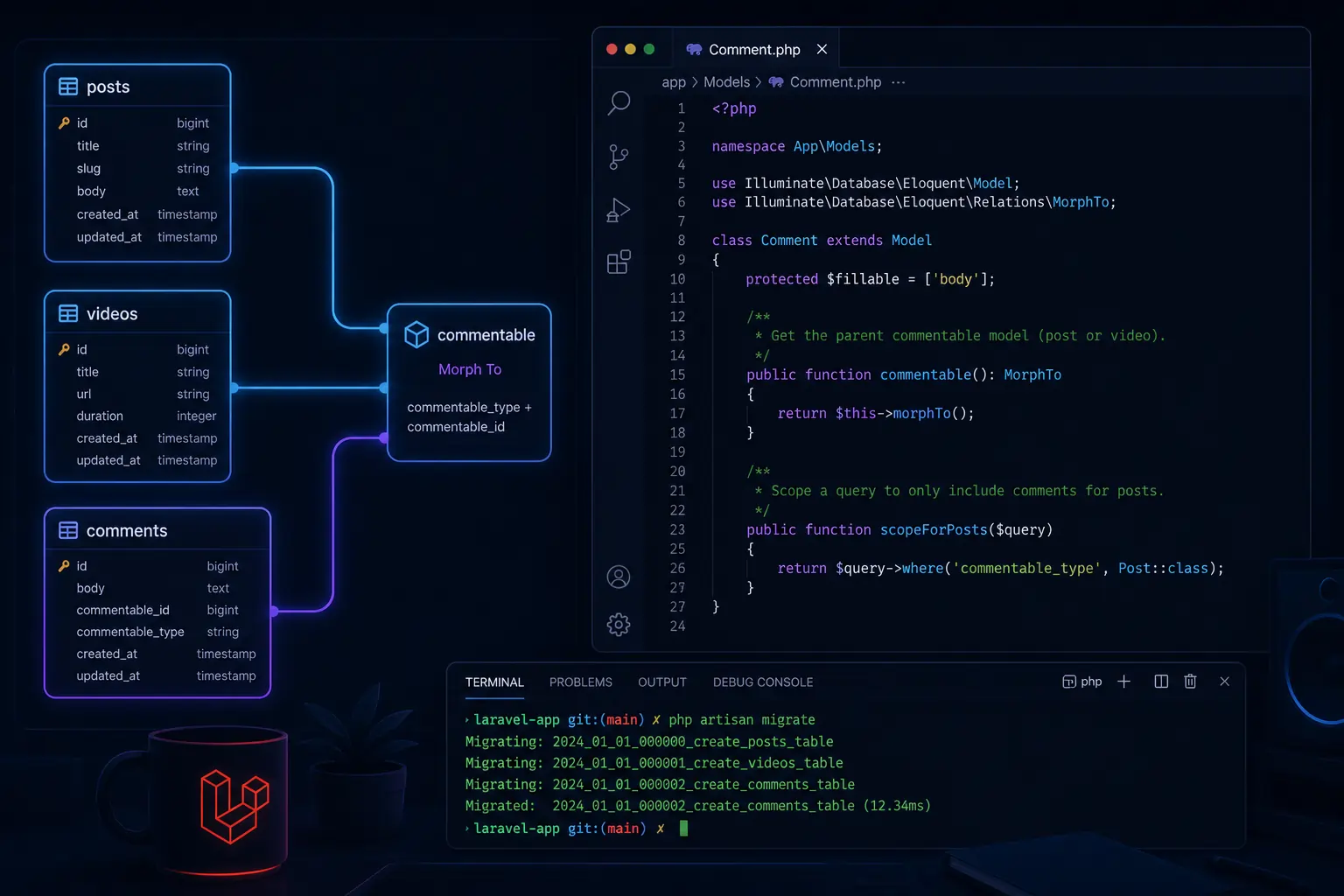
If you’ve been working with Laravel Polymorphic Relationships for a while, you’ve probably hit that moment where you think — “Do I really need to create a separate post_comments table AND a video_comments table AND a product_comments table?” The answer is no. And that’s exactly where polymorphic relationships save you from a messy, repetitive database design.
Polymorphic relationships are one of those Eloquent features that most developers either skip over or find confusing the first time. But once it clicks, you’ll use it everywhere. This article breaks it down developer-to-developer — no fluff, just real code and real use cases.
What Is a Polymorphic Relationship and Why Do You Need It?
Let’s say your app has two models — Post and Video. Both of them can have comments. The naive approach is to create two separate tables:
post_commentsvideo_comments
Now imagine you add a Product model. You create a product_comments table. Then a Photo model — another table. You get the idea. It’s messy, it’s repetitive, and it violates the DRY principle.
A polymorphic relationship lets a single comments table belong to multiple models. Instead of duplicating your comment logic across tables, you store all comments in one place and use two special columns to track which model each comment belongs to.
Those two columns are:
commentable_id— the ID of the related model (e.g.,5for Post ID 5)commentable_type— the class name of the related model (e.g.,App\Models\Post)
This is the core idea. One table. Multiple parent models. Clean, scalable, reusable.
One to One vs One to Many — What’s the Difference?
Before writing any code, let’s quickly clarify the two most common polymorphic types.
One to One Polymorphic means each related model can have one polymorphic record. For example, each Post and each User can have one featured Image.
One to Many Polymorphic means each related model can have many polymorphic records. For example, each Post and each Video can have many Comments.
In real-world apps, One to Many is by far the more common use case — so that’s what we’ll focus on most. But we’ll cover both.
Setting Up the Database Migrations
Let’s build a real example. We have Post and Video models, and we want both to support comments through a single comments table.
The Posts Migration
Schema::create('posts', function (Blueprint $table) {
    $table->id();
    $table->string('title');
    $table->text('body');
    $table->timestamps();
});The Videos Migration
Schema::create('videos', function (Blueprint $table) {
    $table->id();
    $table->string('title');
    $table->string('url');
    $table->timestamps();
});The Comments Migration — The Important One
Schema::create('comments', function (Blueprint $table) {
    $table->id();
    $table->text('body');
    $table->unsignedBigInteger('commentable_id');   // ID of the related model
    $table->string('commentable_type');             // Class name of the related model
    $table->timestamps();
});Or even cleaner — Laravel gives you a shortcut:
Schema::create('comments', function (Blueprint $table) {
    $table->id();
    $table->text('body');
    $table->morphs('commentable'); // Creates both commentable_id and commentable_type
    $table->timestamps();
});morphs('commentable') is the magic helper. It creates both columns and even adds a composite index on them for better query performance.
Setting Up the Models
Now let’s wire up the Eloquent models.
The Comment Model
namespace App\Models;

use Illuminate\Database\Eloquent\Model;

class Comment extends Model
{
    protected $fillable = ['body'];

    /**
     * Get the parent commentable model (Post or Video).
     */
    public function commentable()
    {
        return $this->morphTo();
    }
}The morphTo() method tells Laravel: “Look at the commentable_type and commentable_id columns to figure out which model this comment belongs to.”
The Post Model
namespace App\Models;

use Illuminate\Database\Eloquent\Model;

class Post extends Model
{
    protected $fillable = ['title', 'body'];

    /**
     * Get all comments for this post.
     */
    public function comments()
    {
        return $this->morphMany(Comment::class, 'commentable');
    }
}The Video Model
namespace App\Models;

use Illuminate\Database\Eloquent\Model;

class Video extends Model
{
    protected $fillable = ['title', 'url'];

    /**
     * Get all comments for this video.
     */
    public function comments()
    {
        return $this->morphMany(Comment::class, 'commentable');
    }
}Both Post and Video use morphMany() — because each of them can have many comments. The second argument 'commentable' must match the prefix you used in your migration (commentable_id and commentable_type).
Saving Polymorphic Data
Now let’s actually create some comments.
Adding a Comment to a Post
$post = Post::find(1);

$post->comments()->create([
    'body' => 'This is a great post!',
]);Behind the scenes, Laravel automatically sets commentable_id = 1 and commentable_type = 'App\Models\Post'. You don’t touch those columns manually.
Adding a Comment to a Video
$video = Video::find(3);

$video->comments()->create([
    'body' => 'Awesome video, thanks for sharing!',
]);Same pattern, different parent model. Laravel handles the rest.
Retrieving Polymorphic Data
Get All Comments for a Post
$post = Post::with('comments')->find(1);

foreach ($post->comments as $comment) {
    echo $comment->body;
}Get the Parent of a Comment (the morphTo side)
$comment = Comment::find(5);

$parent = $comment->commentable; // Returns a Post or Video instanceThis is the beauty of it — $comment->commentable dynamically returns the right model based on the commentable_type stored in the database.
Eager Loading to Avoid N+1
Always eager load when looping:
$comments = Comment::with('commentable')->get();

foreach ($comments as $comment) {
    echo get_class($comment->commentable); // App\Models\Post or App\Models\Video
    echo $comment->body;
}One to One Polymorphic — A Quick Example
Let’s say each Post and each User can have one featured Image.
Migration
Schema::create('images', function (Blueprint $table) {
    $table->id();
    $table->string('url');
    $table->morphs('imageable'); // imageable_id + imageable_type
    $table->timestamps();
});Image Model
class Image extends Model
{
    public function imageable()
    {
        return $this->morphTo();
    }
}Post Model
class Post extends Model
{
    public function image()
    {
        return $this->morphOne(Image::class, 'imageable');
    }
}User Model
class User extends Model
{
    public function image()
    {
        return $this->morphOne(Image::class, 'imageable');
    }
}Usage
// Get the image for a post
$post = Post::find(1);
echo $post->image->url;

// Get the image for a user
$user = User::find(2);
echo $user->image->url;

// Get the parent of an image
$image = Image::find(1);
$parent = $image->imageable; // Returns Post or UserClean and simple. One images table serves both models.
Custom Morph Map — Clean Up Those Class Names
By default, Laravel stores the full class name in commentable_type, like App\Models\Post. That’s fine, but it’s fragile — if you ever rename or move your model, all those stored values break.
A better approach is to register a morph map in your AppServiceProvider:
use Illuminate\Database\Eloquent\Relations\Relation;

public function boot()
{
    Relation::morphMap([
        'post'    => \App\Models\Post::class,
        'video'   => \App\Models\Video::class,
        'comment' => \App\Models\Comment::class,
    ]);
}Now Laravel stores post instead of App\Models\Post in the database. It’s shorter, cleaner, and refactor-safe.
Real-World Recap — What Did We Build?
Here’s a quick visual of what the data looks like in the comments table:
| id | body | commentable_id | commentable_type |
|---|---|---|---|
| 1 | Great post! | 1 | App\Models\Post |
| 2 | Loved this video | 3 | App\Models\Video |
| 3 | Really helpful, thanks! | 1 | App\Models\Video |
| 4 | Nice write-up | 2 | App\Models\Post |
One table. Two parent models. No duplication. That’s polymorphic relationships in action.
When Should You Use Polymorphic Relationships?
Use them when:
- Multiple models need the same kind of related data (comments, images, tags, likes, notifications)
- You want to keep your database schema DRY and avoid redundant tables
- The related model (like
Comment) doesn’t fundamentally change based on its parent
Don’t use them when:
- The related data has very different structures depending on the parent
- You need complex joins and filtering — polymorphic queries are slightly harder to query at the raw SQL level
- Your team is new to Laravel and the added abstraction causes confusion
Wrapping Up
Laravel Polymorphic Relationships aren’t complicated — they just look intimidating at first. Once you understand the morphs, morphMany, morphOne, and morphTo pattern, you’ll start seeing use cases everywhere: comments, tags, images, reactions, notifications, activity logs.
The key things to remember:
- Use
morphs('commentable')in your migration to create both columns - Use
morphMany()ormorphOne()in the parent model - Use
morphTo()in the child model - Register a morph map in
AppServiceProviderto keep class names clean - Always eager load with
with('commentable')to avoid N+1 issues
That’s it. Go refactor those duplicate comment tables. 🚀
Have questions or a use case where you’re not sure if polymorphic is the right fit? Drop it in the comments below.
Leave a Reply