
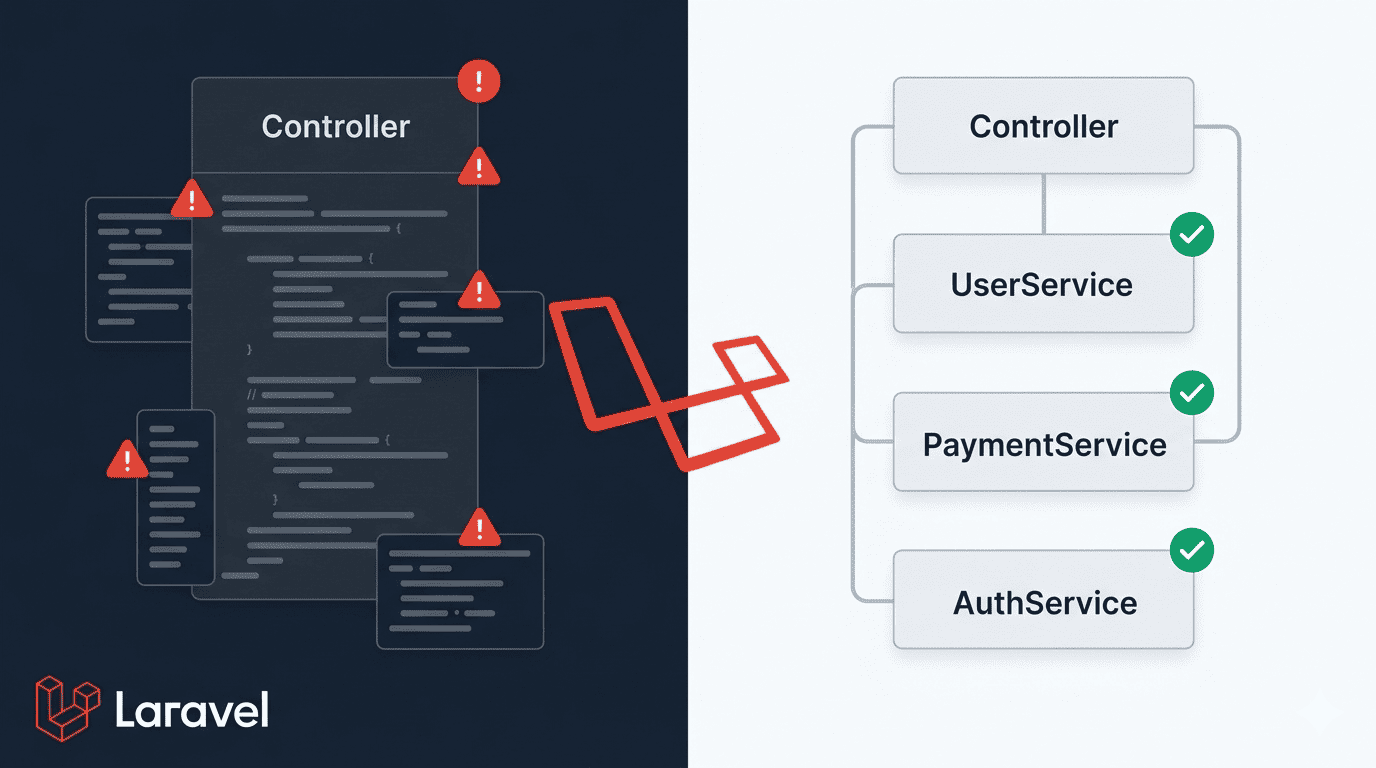
You’ve been there. You open a controller file and scroll… and scroll… and keep scrolling. 400 lines. Maybe 500. Laravel Service Classes exist exactly for this moment — to save you from that mess. If you’ve ever crammed email sending, database logic, wallet creation, and logging all inside one controller method, this post is written for you. No judgment. We’ve all done it. But there’s a better way, and once you see it, you won’t go back. Let’s fix this together.
What Is the Fat Controller Problem?
Here’s the thing — when you’re building fast, it’s tempting to just write everything inside the controller. It works, right? The user registers, the email sends, the record saves. Ship it.
But what you’ve actually done is turn your controller into a dumping ground for Laravel business logic that has no business being there.
Let’s look at a real example. A basic user registration flow — hash the password, save the user, create a wallet, send a welcome email, log the activity. Sounds simple. Watch what it looks like inside a controller:
<?php

namespace App\Http\Controllers;

use App\Models\User;
use App\Models\Wallet;
use App\Models\ActivityLog;
use Illuminate\Http\Request;
use Illuminate\Support\Facades\Hash;
use Illuminate\Support\Facades\Mail;
use Illuminate\Support\Facades\Log;
use App\Mail\WelcomeMail;

class AuthController extends Controller
{
    public function register(Request $request)
    {
        $request->validate([
            'name'     => 'required|string|max:255',
            'email'    => 'required|email|unique:users',
            'password' => 'required|min:8|confirmed',
        ]);

        // Hash the password
        $hashedPassword = Hash::make($request->password);

        // Create the user
        $user = User::create([
            'name'     => $request->name,
            'email'    => $request->email,
            'password' => $hashedPassword,
        ]);

        // Create a wallet for the user
        Wallet::create([
            'user_id' => $user->id,
            'balance' => 0.00,
        ]);

        // Send welcome email
        try {
            Mail::to($user->email)->send(new WelcomeMail($user));
        } catch (\Exception $e) {
            Log::error('Welcome email failed: ' . $e->getMessage());
        }

        // Log the registration activity
        ActivityLog::create([
            'user_id'     => $user->id,
            'action'      => 'registered',
            'description' => 'New user registered successfully',
            'ip_address'  => $request->ip(),
        ]);

        // this is getting out of hand

        // Generate token
        $token = $user->createToken('auth_token')->plainTextToken;

        return response()->json([
            'message' => 'Registration successful',
            'token'   => $token,
            'user'    => $user,
        ], 201);
    }
}That’s one method. One. And it already has 60+ lines of mixed concerns.
Now imagine adding social login, referral bonuses, or KYC verification later. This file becomes untouchable. The fat controller Laravel problem is real — and the pain compounds over time.
Why is this bad?
- Hard to test — you can’t unit test just the wallet creation without triggering the whole register flow
- Hard to reuse — if your API and a CLI command both need to register a user, you’re copying code
- Hard to read — a new developer opens this and has no idea where one responsibility ends and another begins
- Fragile — changing the email logic can accidentally break the wallet logic sitting two lines below it
What Is a Laravel Service Class?
A Service Class is just a plain PHP class that holds your business logic. That’s it. No magic. No Laravel-specific interface you need to implement. Just a class with methods.
Think of it like a restaurant. The controller is the waiter — it takes your order and brings back the food. The Service Class is the chef — it actually does all the cooking. The waiter doesn’t need to know how the food is made. They just pass the order and deliver the result.
Clean separation. Clear responsibility.
Here’s what you get with Laravel Service Classes:
- Reusability — call the same service from a controller, a job, an artisan command, anywhere
- Testability — mock and test the service in isolation, no HTTP request needed
- Separation of concerns — your controller handles HTTP, your service handles logic
- Cleaner controllers — a controller method becomes 5–8 lines max
- Easier onboarding — new devs immediately understand where logic lives
This is a core part of Laravel best practices and the service layer pattern that scales well as your app grows.
How to Create and Use a Service Class in Laravel
Step 1 — Create the Services Folder
Laravel doesn’t create this folder for you. That’s fine. Just make it yourself:
mkdir app/ServicesThat’s your home for all service classes going forward. Keep it organised — you can even add subfolders like app/Services/Auth/ or app/Services/Payment/ as the project grows.
Step 2 — Create the UserService
Now create app/Services/UserService.php:
<?php

namespace App\Services;

use App\Models\User;
use App\Models\Wallet;
use App\Models\ActivityLog;
use App\Mail\WelcomeMail;
use Illuminate\Support\Facades\Hash;
use Illuminate\Support\Facades\Mail;
use Illuminate\Support\Facades\Log;

class UserService
{
    /**
     * Handle full user registration logic.
     */
    public function register(array $data, string $ipAddress): array
    {
        // Create the user with a hashed password
        $user = User::create([
            'name'     => $data['name'],
            'email'    => $data['email'],
            'password' => Hash::make($data['password']),
        ]);

        // Every new user gets a wallet starting at zero
        Wallet::create([
            'user_id' => $user->id,
            'balance' => 0.00,
        ]);

        // Fire the welcome email — catch failures silently
        try {
            Mail::to($user->email)->send(new WelcomeMail($user));
        } catch (\Exception $e) {
            Log::error('Welcome email failed for user ' . $user->id . ': ' . $e->getMessage());
        }

        // Track this action in the activity log
        ActivityLog::create([
            'user_id'     => $user->id,
            'action'      => 'registered',
            'description' => 'New user registered successfully',
            'ip_address'  => $ipAddress,
        ]);

        // Return the user and their fresh token
        return [
            'user'  => $user,
            'token' => $user->createToken('auth_token')->plainTextToken,
        ];
    }
}All the business logic lives here now. The service doesn’t know or care about HTTP requests, responses, or validation. It just does its job.
Step 3 — Inject It Into the Controller
Now update your AuthController to use the service via constructor injection:
<?php

namespace App\Http\Controllers;

use App\Services\UserService;
use Illuminate\Http\Request;

class AuthController extends Controller
{
    // Laravel auto-resolves this via the service container
    public function __construct(protected UserService $userService)
    {}

    public function register(Request $request)
    {
        $request->validate([
            'name'     => 'required|string|max:255',
            'email'    => 'required|email|unique:users',
            'password' => 'required|min:8|confirmed',
        ]);

        // Hand off to the service — controller's job is done here
        $result = $this->userService->register(
            $request->only('name', 'email', 'password'),
            $request->ip()
        );

        return response()->json([
            'message' => 'Registration successful',
            'token'   => $result['token'],
            'user'    => $result['user'],
        ], 201);
    }
}Look at that. The controller validates the input, calls the service, returns the response. That’s its only job now. Trust me, future you will thank you.
Laravel’s Service Container automatically resolves the UserService dependency — you don’t need to manually instantiate it anywhere.
Before vs After — Let’s Be Honest About the Difference
BEFORE feels like opening a junk drawer. Everything is technically in one place, but finding anything — or changing anything — is stressful. You’re scared to touch it because you don’t know what’ll break.
AFTER feels like a clean desk. One file does one thing. You know exactly where to go when something needs to change.
Here’s the visual proof:
// BEFORE — AuthController@register (60+ lines, mixed responsibilities)

public function register(Request $request)
{
    $request->validate([...]);

    $hashedPassword = Hash::make($request->password);
    $user = User::create([...]);
    Wallet::create(['user_id' => $user->id, 'balance' => 0]);
    Mail::to($user->email)->send(new WelcomeMail($user));
    ActivityLog::create([...]);
    $token = $user->createToken('auth_token')->plainTextToken;

    return response()->json([...]);
    // ...and it keeps growing with every new feature
}
// AFTER — AuthController@register (clean, focused, readable)
public function register(Request $request)
{
$request->validate([...]);
$result = $this->userService->register(
$request->only('name', 'email', 'password'),
$request->ip()
);
return response()->json([
'message' => 'Registration successful',
'token' => $result['token'],
'user' => $result['user'],
], 201);
}The controller went from being a novel to being a paragraph. All the logic still exists — it just lives where it belongs.
When Should You Use Service Classes?
Now here’s where it gets interesting — Laravel Service Classes aren’t something you bolt onto every single feature. Use them when the logic is complex, reusable, or multi-step.
Use a Service Class when you’re dealing with:
- 💳 Payment processing — charge a card, update order status, send receipt, notify admin
- 📧 Notification flows — emails, SMS, push — logic that might be triggered from multiple places
- 🔐 Authentication logic — register, login with 2FA, social auth, password reset flows
- 🌐 Third-party API calls — Stripe, Twilio, Firebase, any external service integration
- 📊 Complex database queries — multi-step data aggregation that doesn’t belong in a model or controller
- 🔄 Logic called from multiple places — an API controller, an artisan command, and a webhook handler all needing the same thing
- 🧾 Report generation — pulling, formatting, and exporting data
Don’t use a Service Class for:
Simple CRUD. If your controller is just doing User::all() or Post::find($id) — don’t add a service layer just for the sake of it. That’s over-engineering, and it adds complexity without any real benefit. [Check out our Laravel Repository Pattern article for when abstraction makes sense with data access too.]
The goal is Laravel clean code — not more files for the sake of more files.
The fat controller Laravel problem doesn’t happen because developers are lazy — it happens because we’re moving fast and the controller is always right there. But the longer you let it grow, the harder it becomes to maintain, test, or hand off to someone else.
Start with one service class in your next feature. Just one. You’ll immediately feel the difference in how easy it is to write a test or reuse that logic somewhere else. The service layer pattern isn’t a fancy architecture concept — it’s just good housekeeping.
Refactor one controller this week. Your codebase will thank you.
Leave a Reply